Dual USB ports, keep Front USB, Add Rear USB port, Carplay , Android Auto.
You will not see the messy data cable on the front panel, it looks more concise and neat.
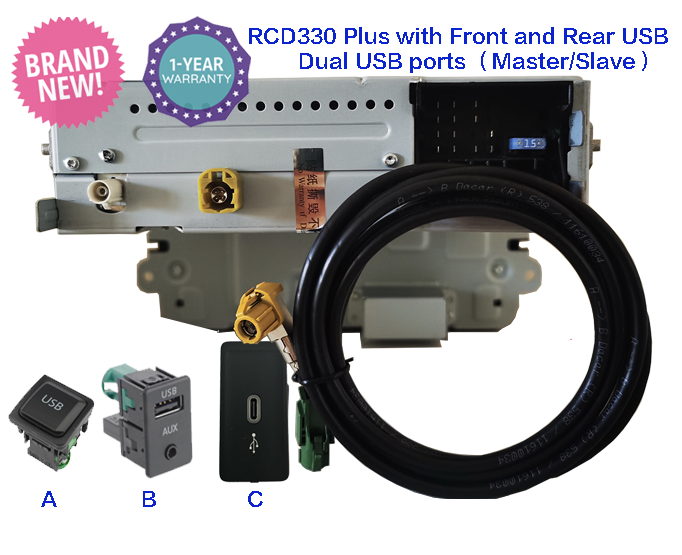
The genuine RCD330 Plus Noname 187B
Android Auto / Carplay /Mirror link
For all Volkswagen PQ car

For Fabia / Octavia / Superb / Yeti etc
Green light Noname 187B or + rear USB or + Wireless Car play dongle.
German, Spanish, Portuguese, Russian, English

Come with Carplay , Mirrorlink, with out android auto.

Noname 280B
Android auto, Carplay. + Rear USB
MQB Volkswagens Original Unit.
USB original installation

FIts Golf 6/7 R/GTI MK6 MK7, Polo C/R/GTI/Plus, EOS/Beetle/Passat CC/Scirocco For RCD330 Plus


B6 2010 Passat + Dynaudio

Quote from uw320 on March 7, 2024, 8:09 amI recently purchased the RCD330+ (6RF 035 187E) and have installed it into my 2010 Passat Highline with Dynaudio.
I followed the instructions, except I didn't unplug the amplifier beforehand.
Unplugged the Bluetooth module
unplugged the old radio
installed new radio
turned new radio on (got sound right away)
turned radio off
began initial coding, enabled developer mode first)
All the coding was accepted which was (02 for Skoda, 00 for Sound System installed, and 01 for Treble Speaker disabled) and then I rebooted the radio and got no sound
I unplugged the battery for 10 minutes. When I plugged it back in I also had no sound.
The only way I get sounds if I code 00 for Byte 1, 04 for Byte 2, and 04 for Byte 4.
when I do that coding it's accepted and the audio sounds fine but the volume is really loud, it distorts when I turn it up but it's definitely much louder than my previous RNS-510.
I have also disabled Telephone, Media Player 3, and Navigation in the Installation List, but I get a lot of errors in VCDS regarding the individual speakers, I assume that's because the coding for the amplifier is incorrect?
Any help would be appreciated, I don't want to damage my amplifier. Thank you.
I recently purchased the RCD330+ (6RF 035 187E) and have installed it into my 2010 Passat Highline with Dynaudio.
I followed the instructions, except I didn't unplug the amplifier beforehand.
Unplugged the Bluetooth module
unplugged the old radio
installed new radio
turned new radio on (got sound right away)
turned radio off
began initial coding, enabled developer mode first)
All the coding was accepted which was (02 for Skoda, 00 for Sound System installed, and 01 for Treble Speaker disabled) and then I rebooted the radio and got no sound
I unplugged the battery for 10 minutes. When I plugged it back in I also had no sound.
The only way I get sounds if I code 00 for Byte 1, 04 for Byte 2, and 04 for Byte 4.
when I do that coding it's accepted and the audio sounds fine but the volume is really loud, it distorts when I turn it up but it's definitely much louder than my previous RNS-510.
I have also disabled Telephone, Media Player 3, and Navigation in the Installation List, but I get a lot of errors in VCDS regarding the individual speakers, I assume that's because the coding for the amplifier is incorrect?
Any help would be appreciated, I don't want to damage my amplifier. Thank you.

Quote from Ddren on March 7, 2024, 9:29 amFirst of all, not all Dynaudio sound systems are compatible with RCD330 plus, and Passat is also divided into North American and European versions. Usually the trunk of Passat in Canada and the United States is opened by using the handle, while the European version of Passat is opened by flipping the Volkswagen badge. Usually, the Passat in Australia, Europe, South Asia and other regions is the European version.
Provide your VIN code and your region. I can help you check if your amplifier model is compatible with the RCD330 plus.
As long as the RCD330 plus is compatible with your amplifier, you will need to change the coding of RCD330 PLUS to the following:
16020040010005
You just need to find your original Bluetooth module under the passenger seat, unplug it and make it stop working completely. The purpose of unplugging is to disconnect the mobile phone and Bluetooth, otherwise once your mobile phone is connected to the original Bluetooth module, when you are on the phone with your friend, the other party will not be able to hear your voice.
First of all, not all Dynaudio sound systems are compatible with RCD330 plus, and Passat is also divided into North American and European versions. Usually the trunk of Passat in Canada and the United States is opened by using the handle, while the European version of Passat is opened by flipping the Volkswagen badge. Usually, the Passat in Australia, Europe, South Asia and other regions is the European version.
Provide your VIN code and your region. I can help you check if your amplifier model is compatible with the RCD330 plus.
As long as the RCD330 plus is compatible with your amplifier, you will need to change the coding of RCD330 PLUS to the following:
16020040010005
You just need to find your original Bluetooth module under the passenger seat, unplug it and make it stop working completely. The purpose of unplugging is to disconnect the mobile phone and Bluetooth, otherwise once your mobile phone is connected to the original Bluetooth module, when you are on the phone with your friend, the other party will not be able to hear your voice.
Quote from uw320 on March 7, 2024, 8:03 pmI understood that when I ordered the RCD330. I had seen on here or another forum that a user also from Canada had gotten it to work with his Dynaudio in his B6 Passat so that's why I ordered the same one.
I'm from Canada and my VIN is WVWVU9AN3AE105936
I have already disconnected the Bluetooth module under the passenger seat.
Thank you for your help
I understood that when I ordered the RCD330. I had seen on here or another forum that a user also from Canada had gotten it to work with his Dynaudio in his B6 Passat so that's why I ordered the same one.
I'm from Canada and my VIN is WVWVU9AN3AE105936
I have already disconnected the Bluetooth module under the passenger seat.
Thank you for your help