Keep the original front USB while adding a hidden rear USB port for a cleaner OEM-style setup. No more messy front-panel cables — enjoy a more concise, neat, and factory-like interior appearance.

Genuine RCD330 Noname 187B Radio
OEM Integration with CarPlay, Android Auto & MirrorLink, Backed by 1-Year Warranty.

For Fabia / Octavia / Superb / Yeti | Multi-Language Support | 1-Year Warranty

Apple CarPlay & MirrorLink | English / German Language | 1-Year Warranty

MQB OEM Upgrade System
CarPlay & Android Auto | Optional Rear USB-C | 1-Year Warranty

Fits almost Volkswagen models with flip badge trunk handle (Golf, GTI, Polo, European-spec Passat, CC, Beetle, EOS & more) | Supports aftermarket head units | 1-Year Warranty


Golf 5 backup camera installation

Quote from eugen.shvatsky on July 14, 2020, 4:43 pmI've installed a flip camera (with OBD support 🙁 ) on my golf5 and found a strange behavior.
the first time it lanches (- acc connected) it works, but says "no can".
if I switched the ignition off and remove the key, after some period of time turn the car on again, it stops working.
I need to switch "-" acc off wait a while, switch it on. and it works with "no can" message and again after key removed from the ignition, it stops workingI have PQ quadlock, but looks like the camera required MIB.maybe I'm selected the wrong fuse to connect?I've inserted power cable into 16 fuse place (maybe wrong place?)all features, like flip and rear door opening, is working fine.maybe someone know how to resolve this.
I've installed a flip camera (with OBD support 🙁 ) on my golf5 and found a strange behavior.
the first time it lanches (- acc connected) it works, but says "no can".
if I switched the ignition off and remove the key, after some period of time turn the car on again, it stops working.

Quote from Ddren on July 20, 2020, 11:40 amYou'd better provide some pictures, it may be easier to help you solve this problem.
First of all, if the screen of your head unit displays "No CAN", which is usually liked, it means that your reversing camera supports dynamic trajectory and needs to be connected to CANBUS. In most cases, you can still get images when reversing. But there is no hint of dynamic trajectory.
If the image occasionally disappears when you are reversing, you need to check ACC 12V+.
You'd better provide some pictures, it may be easier to help you solve this problem.
First of all, if the screen of your head unit displays "No CAN", which is usually liked, it means that your reversing camera supports dynamic trajectory and needs to be connected to CANBUS. In most cases, you can still get images when reversing. But there is no hint of dynamic trajectory.
If the image occasionally disappears when you are reversing, you need to check ACC 12V+.
Quote from eugen.shvatsky on July 20, 2020, 12:07 pmYes, you were right. I've re-installed all power cables and all start working expect small bug.
when I turn the ignition on, the camera works ok (there still message no can). But after a short ride (5 min approx.) when I'm trying to part camera wont work.
I've got an alert "camera not found".
I need to switch the ignition off, then on again and it starts working.
no idea how to resolve this.
Yes, you were right. I've re-installed all power cables and all start working expect small bug.
when I turn the ignition on, the camera works ok (there still message no can). But after a short ride (5 min approx.) when I'm trying to part camera wont work.
I've got an alert "camera not found".
I need to switch the ignition off, then on again and it starts working.
no idea how to resolve this.
Quote from Ddren on July 20, 2020, 12:24 pmIs your head unit RCD330 PLUS?
Can you provide the following link to purchase your camera?
I need to confirm your product introduction.
Does your camera need to be connected to the reversing light?
Is your head unit RCD330 PLUS?
Can you provide the following link to purchase your camera?
I need to confirm your product introduction.
Does your camera need to be connected to the reversing light?
Quote from eugen.shvatsky on July 20, 2020, 12:27 pmRCD330 PLUS, bought in the local store (if this means no help then ok)
my camera connected to reversing lights (flip camera)
RCD330 PLUS, bought in the local store (if this means no help then ok)
my camera connected to reversing lights (flip camera)
Quote from Ddren on July 20, 2020, 12:32 pmYou may directly use the reversing lights to power the reversing camera, which is unstable power supply. You'd better install a delay box. You’d better provide an overall picture of your flip camera, including cables. I will know how to solve it.
You may directly use the reversing lights to power the reversing camera, which is unstable power supply. You'd better install a delay box. You’d better provide an overall picture of your flip camera, including cables. I will know how to solve it.
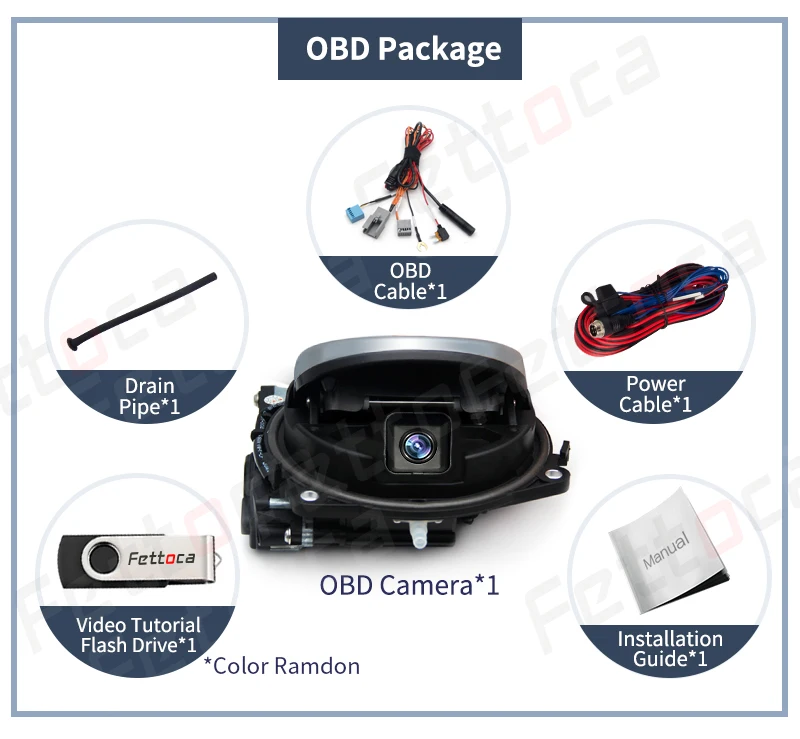
Quote from eugen.shvatsky on July 20, 2020, 12:46 pmThis is show my camera looks like. Power cable (on picture) connected to 12+ and to revers lights.
Obd cable (on picture) connected to quadlock and to acc 12+
This is show my camera looks like. Power cable (on picture) connected to 12+ and to revers lights.
Obd cable (on picture) connected to quadlock and to acc 12+
Quote from Ddren on July 20, 2020, 1:35 pmThis camera does not need to be connected to a reversing light. First of all, you must find the correct ACC12V+ in the fuse box, and then you need to connect CANBUS+ and CANBUS-, otherwise it will not work properly. CANBUS+ and CANBUS- need to break the skin of the wire and leak the copper wire in the wire, otherwise it is easy to falsely connect . In addition, you must confirm whether your car has an ESP function. Without this camera, it will not work properly.
This camera does not need to be connected to a reversing light. First of all, you must find the correct ACC12V+ in the fuse box, and then you need to connect CANBUS+ and CANBUS-, otherwise it will not work properly. CANBUS+ and CANBUS- need to break the skin of the wire and leak the copper wire in the wire, otherwise it is easy to falsely connect . In addition, you must confirm whether your car has an ESP function. Without this camera, it will not work properly.
